Employee directory software: only 2 live in Slack or Teams
Most employee directory tools ask you to open a new app. We looked at the six that come up most often and found only two that don't.


Search "employee directory software" and you'll get fifteen tools that all do roughly the same thing: a searchable list of people, their roles, maybe an org chart, maybe a skills index. What the lists don't tell you is that almost none of them live where your team already spends the day.
That's worth pausing on. Slack says 77 of the Fortune 100 run on it, on top of more than 200,000 paid customers, and plenty of the rest run on Microsoft Teams instead. If your company is already one of them, a directory that lives in a separate app isn't a small tradeoff. It's asking people to leave the room they're already standing in.
A directory nobody opens is just a database with a login screen.
What counts as employee directory software (and what doesn't)
An employee directory tool does three things: it lists everyone in the company, it shows how they relate to each other (who reports to whom, who's on which team), and it keeps that information current without someone manually re-typing it every time there's a hire or a move.
That third part is the whole game. A directory that's two months out of date is worse than no directory, because people stop trusting it and go back to asking around in DMs, which is the exact problem it was supposed to solve.
What it isn't: an HRIS (that's your system of record for pay, benefits and compliance), a project tool with an assignee list, or a Notion page someone built once and never touched again. Plenty of teams mistake one of those for a directory until they hit 40 people and it falls apart.
What to look for before you buy
Does it update itself, or does someone maintain it
The honest question to ask a vendor isn't "do you have an org chart." It's "what happens the day after someone gets promoted." If the answer involves a spreadsheet, a CSV import, or a person remembering to click edit, the directory will be stale within a quarter. Look for a tool that syncs from your HRIS automatically, not one that treats sync as a nice-to-have integration.
Does it live where people already work
Every tool on this list can show you an org chart. Far fewer of them show it to you in the place you're already looking twenty times a day. If people have to remember a URL, a separate login, and a reason to go there, adoption decays fast. This is the actual argument for a chat-native tool over a standalone one: it isn't a nicer UI, it's zero additional destinations.
How it's priced
Directory tools are priced three different ways: a flat platform fee regardless of size, a per-admin seat model that punishes you for giving more people edit access, or a per-employee, per-module rate you can drop if you stop using it. The first two assume you're buying a platform. The third assumes you're buying a feature. Know which one you're actually shopping for, and check the vendor's own pricing page rather than a reseller's estimate, since none of the structures above are static.
The best employee directory software for Slack and Microsoft Teams teams (yes it's a lot of teams)
We looked at the tools that show up across the "best employee directory software" roundups, then narrowed to the ones worth a Slack or Teams company's time.
BuddiesHR (Linky)
Linky is the directory and org chart module inside BuddiesHR, built to run in Slack and Microsoft Teams rather than beside them. Profiles, skills and the org chart update automatically from your HRIS connection, so nobody owns a manual sync job. It installs in about a minute, it's free under 10 employees, and because it's one module in a modular suite, you're not buying an intranet to get a directory. BuddiesHR is rated 4.8/5 on G2 across its full suite of Slack and Teams apps, including a G2 Grid Leader badge.
The honest limitation: if you want a directory as part of a full HR data platform with deep custom reporting, Linky is not that. It does one job, in the tool you're already in.
Slack Atlas
The other genuinely Slack-native option on this list, and worth naming directly because it's the fairest comparison. Atlas is Slack's own org chart and profile layer, built into paid Slack plans. It's a reasonable choice if you're deep in Slack's ecosystem and don't need Teams support, cross-module recognition or PTO data in the same place. It doesn't extend to Microsoft Teams, and it isn't its own module you can add or drop, since it's tied to your Slack plan tier.
Pingboard
An org-chart specialist with genuinely good visualization, built as its own standalone web app. Strong if the org chart itself, not the day-to-day directory lookup, is the primary use case. It has no native presence inside Slack or Teams, so it's another tab and another login for the rest of the company.
GoProfiles
Leans into recognition and "get to know you" profile content alongside the directory function. Useful for culture-building teams that want profiles to double as a kudos surface. Also a standalone app, with Slack and Teams available as an integration rather than as the tool's home.
ChartHop
Positioned more as an HR data and analytics platform than a directory tool specifically, with org chart and headcount planning layered on top. Powerful if you need workforce analytics; a heavier buy than most SMBs need if a directory is the actual, immediate problem.
Sift
Built for larger organizations that need fast, permissioned search across a big employee base, closer to an internal people-search engine than a lightweight directory. Standalone web app, no native Slack or Teams surface.
Quick comparison
| Tool | Lives in Slack/Teams | Auto-syncs from HRIS | Pricing shape |
|---|---|---|---|
| BuddiesHR (Linky) | Both | Yes | Per module, per employee |
| Slack Atlas | Slack only | Slack directory data | Bundled into Slack plan tier |
| Pingboard | No | Integration available | Platform / per-user |
| GoProfiles | No (integration) | Integration available | Platform / per-user |
| ChartHop | No (integration) | Yes | Platform, data-heavy |
| Sift | No | Integration available | Platform, enterprise-oriented |
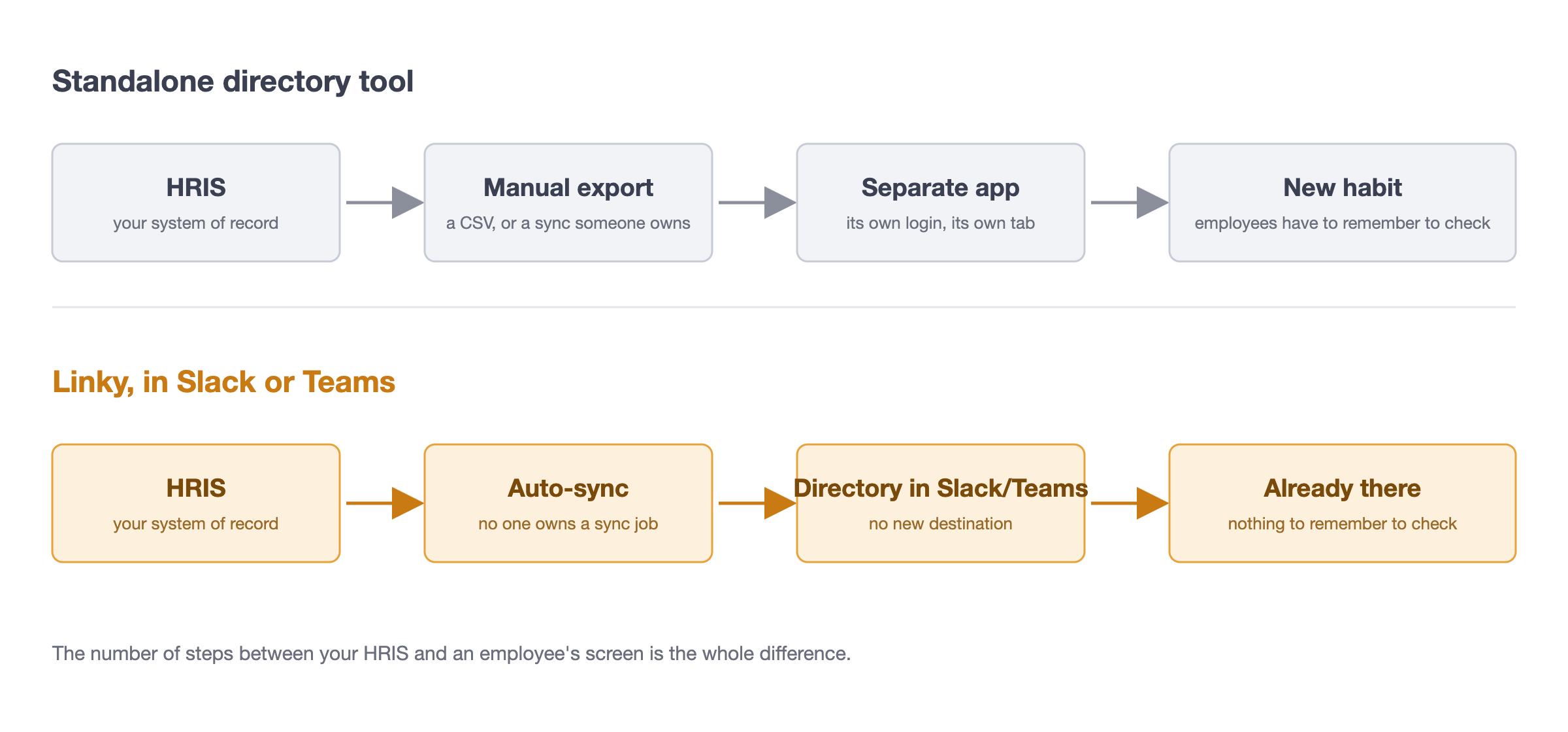
Standalone tool vs. one that lives in Slack or Teams
The difference isn't cosmetic. It's where the data has to travel and how many places a person has to remember to check.
What a directory actually needs to do well
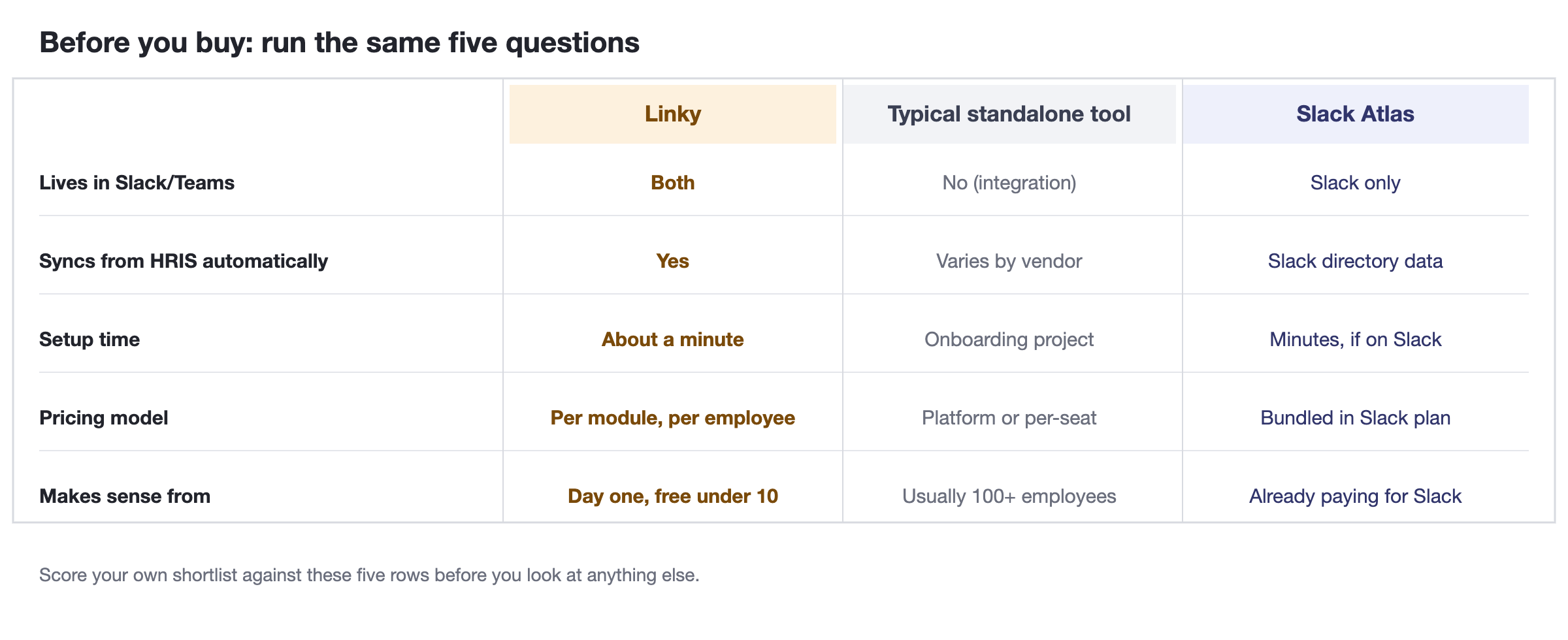
Before you sign up for anything, run it against the same five questions, for BuddiesHR, for Slack Atlas, and for whatever standalone tool you're weighing.
How to roll one out without it going stale again
Most directories don't fail at launch. They fail six months later, when the sync job someone set up manually quietly breaks and nobody notices until a new hire can't find their manager's profile.
Three things make the difference:
- Connect the HRIS sync before you invite anyone, not after. A directory that launches already wired to payroll or HR data never has a "day one" data-entry problem to begin with.
- Put it somewhere with zero extra clicks. If people have to open a new app to check it, they'll ask in a DM instead, and the directory becomes something only HR uses.
- Revisit it once, at the 90-day mark, to check that new hires, role changes and departures from the last quarter actually show up correctly. After that, if the sync is real, it should need nothing from you.
If you're on Slack already and want the org chart side of this covered in more detail, we've written about building an org chart directly from Slack and rounded up the broader set of org chart apps for Slack, including a closer look at Slack Atlas alternatives if Atlas is your starting comparison point.
FAQs
What is employee directory software?
A tool that lists everyone in a company, shows reporting lines and team structure, and keeps that information current, usually by syncing with an HRIS rather than relying on manual updates.
Do I need employee directory software under 50 employees?
Below about 20 to 30 people, most teams get by on memory and a shared doc. Past that, informal knowledge stops scaling, which is usually the point people start looking. BuddiesHR's Linky is free under 10 employees if you want to set it up early, before it becomes a problem.
Does Slack have a built-in employee directory?
Slack has basic profile fields, and Slack Atlas adds a fuller org chart and directory layer on top of paid plans. It's Slack-only and tied to your Slack plan tier rather than being a standalone add-or-drop module.
How much does employee directory software cost?
It varies by pricing shape as much as by vendor: some charge a flat platform fee, some charge per admin seat, and some, including BuddiesHR, charge per employee for the specific module you use. Check each vendor's current pricing page directly, since none of these are fixed.
Ready to see it in Slack or Teams? Install Linky free for teams under 10 employees, or add it alongside the rest of BuddiesHR's modules.