360 Feedback in Slack (without forms or spreadsheets)
Run 360 feedback in Slack without forms and spreadsheets. Discover how to integrate review tools, like Simpleperf, in Slack for automated and simple reviews.


Modern teams live in Slack. Conversations, collaboration, decisions, praise, and innovation happen there in real-time. What doesn’t often happen there are performance reviews, mostly because people don’t know that you can do this in Slack.
We want to turn this around, showing you how simple it is to integrate dedicated performance review software into Slack and get great data without ever leaving Slack. Right away, this gives you the power to automate performance workflows inside Slack and improve the way you do 360 evaluations. Sound good? Then let’s get started.
If you want to know how this works straight away, integrate Simpleperf with Slack and request your first 360-degree feedback in minutes. Get started now with Simpleperf.
Quick Overview
360 feedback in Slack allows businesses to run structured 360-degree performance reviews without relying on forms or spreadsheets or leaving Slack. By integrating software, such as Simpleperf, teams can customize review cycles, request feedback, and collect historical performance data, improving the performance management process.
Table of Contents
- What is 360-degree feedback in Slack?
- Why run 360 reviews directly in Slack?
- Core features of a good 360-degree feedback app in Slack
- How 360 feedback flows inside Slack (step-by-step)
- Use cases: Where 360 feedback works best in Slack
- Bringing it all together
- FAQs: 360 feedback in Slack
What is 360-degree feedback in Slack?
360 feedback in Slack means running peer, manager, self, and customer reviews within Slack channels, eliminating the need for a separate platform and additional forms. A 360 review is also called multi-rater feedback and is a performance evaluation method where anonymous feedback is requested from multiple sources, not just the manager.
This way of rating individual and team performance provides a more balanced perspective of the employee’s strengths, development areas, and blind spots. Running such reviews from Slack, it provides an opportunity to do these reviews where people are already working.
Why run 360 reviews directly in Slack?

Let’s put it like this. You want to run reviews in Slack because you don’t want to spend weeks setting up spreadsheets, developing forms, and pasting data from one place to the next, and begging team members to fill in your forms. All this while you try to make sense of the feedback you get back.
Slack provides the structure for the automation of performance reviews, where reviews are generated, reminders sent, and prompts automatically made for incomplete information - all in Slack, and without a whole lot of extra work for you.
This look at AI for performance reviews will help first-time users to understand the benefits of automating performance reviews and how AI-driven insights can improve their performance review process.
Core features of a good 360-degree feedback app in Slack
Employees are notoriously slow to respond to 360 review requests. It isn’t personal, it’s just human behavior. The only solution that cuts through behavior is to meet them where they’re at. By integrating a performance review tool with Slack, you don’t follow up, and your employees have eyes on the review because it’s in front of them. But you still need the right tool to catch their attention (there’s a lot out there competing for it). These features give you the best chance of doing that.
- Simple message forms with a Slack-first design (it looks familiar). When a feedback request shows up alongside other activities and doesn’t look complicated, it triggers the desire to complete the request.
- Real-time insights. People like instant reward for their efforts, so by acknowledging their submission and showing them completion rates, they feel they’ve done their bit.
- Reduced context switching. Tools that allow customization of forms to match company culture do better than standardized templates. Why? When people understand what you want, they are faster to respond.
- AI-driven prompts for more information. Some review questions demand more thought. When workers are busy, this feels like effort, but AI takes some of the mental burden away by asking focused questions. This helps the reviewer respond more quickly and accurately to the questions.
- Reminders that don’t require manual work. Smart reminders appear at the right time without any intervention from the manager or HR. You schedule review tasks, and Slack takes care of the rest, sending review triggers to the right people.
Eager to get started with a simplified review process? Start with a tool built lean (but still has all these features). Go live with your first Simpleperf review in minutes.
How 360 feedback flows inside Slack (step-by-step)
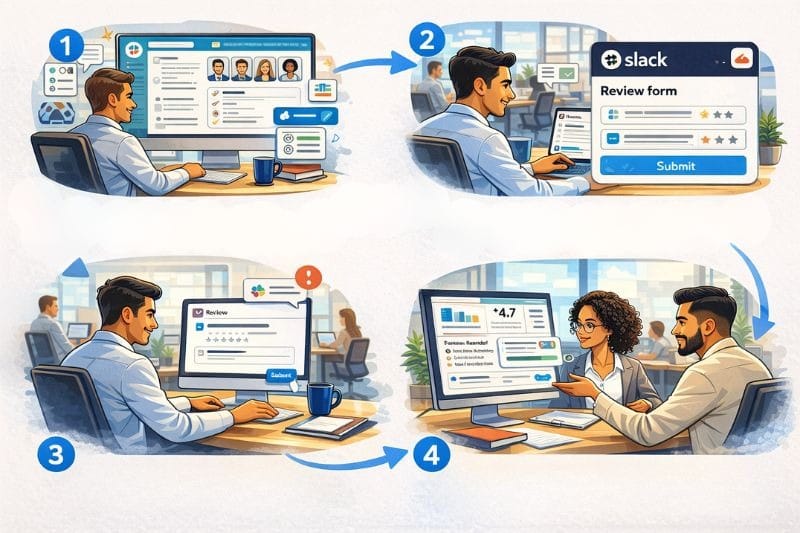
The best performance review software all operate along the same lines. They provide a structured approach to gathering performance information and take the effort out of doing it. While each product has unique aspects, the process for conducting reviews follows this familiar pattern.
Step 1:
The manager or HR customizes reviews and sets up a review cycle. They choose reviewers (peers, managers, direct reports, customers) from Slack lists. Some tools will suggest reviewers based on channel interactions or past evaluations.
Step 2:
Slack sends a DM to reviewers, providing them with access to a review form and providing simple instructions on how to complete the review.
Step 3:
Using buttons, message actions, or simple forms, the reviewer completes the evaluation. This can be done in minutes. This reduces the mental load and makes it easier to complete.
Step 4:
Automated reminders are sent at regular intervals alongside other communication, encouraging engagement. This continues until the feedback window closes.
Step 5:
Summaries and results are viewed via a private or channel DM for employees and managers. Managers have access to a dashboard for a comprehensive view of the results.
Step 6:
Managers use AI-driven insights to conduct more meaningful 1:1 meetings and performance reviews.
From start to finish, the focus is on reducing administrative load for managers and HRs, and making it easy for employees to respond to review requests. However, it plugs into a very important aspect of successful performance discussions - the habit of continuous feedback. A Gallup study found that engagement is highest amongst employees who get feedback at least once a week. The information obtained from 360 reviews serves as the source for shorter performance check-ins.

Use cases: Where 360 feedback works best in Slack
360-degree feedback can be used as part of an annual performance review. It works best when it is linked to real work. The reason for this is: recency. Very few people remember how someone performed on a certain project or task 3, 6, or 9 months ago. But if feedback happens right after a project, task, event, or initiative, it has a greater chance of being fair. To facilitate growth through better feedback, run reviews:
- Within days of project completion, when successes and failures are fresh in the minds of the team.
- When important tasks or initiatives have been completed.
- During the onboarding programs. Request feedback at 30, 60 and 90-day intervals.
- When employees enter into new positions, and need progress feedback after a certain period (e.g., a quarter).
- During leadership development programs, managers need developmental feedback.
- Prior to one-on-one performance discussions.
- After cross-functional initiatives, where everyone doesn’t report to the same manager.
- To gather information about the collaborative efforts of remote or hybrid teams.
Employees who receive regular feedback are:
- 5.2x more likely to strongly agree that they receive meaningful feedback.
- 3.2x more likely to strongly agree they are motivated to do outstanding work.
- 2.7x more likely to be engaged at work. [1]
Bringing it all together
One cannot ignore the untapped potential of Slack for running performance reviews, especially because it is so simple. You need to evaluate employee performance, but what you don’t need is more forms and spreadsheets to create and manage. Making the process more cumbersome only decreases participation, and that’s why Slack is the perfect solution. It doesn’t require much of you, yet it yields powerful results.
Companies that have used a Slack performance review tool have the following comments:
- ‘Finally, a review tool that didn't require a week of training to use.’
- ‘The AI prompts made the feedback much more useful. Total game changer.’
* Courtesy of Simpleperf
If companies are ever going to run successful review programs, the shift to Slack native tools shouldn’t just be a novel idea, but a clever business strategy. In business and in life, the biggest gains are often made from simple and easy-to-execute ideas. This is true for 360-degree feedback in Slack, too.
Register for Simpleperf now and run your first cycle for free. This way, you can test the validity of our argument and see for yourself how it works.
FAQs: 360 feedback: Slack
1. What is the 360-degree feedback method?
The 360-degree feedback method is an evaluation tool that allows multiple reviewers to comment (or give feedback) on an employee’s performance. This includes peers, cross-functional team members, managers, and direct reports. It is considered a fairer and more comprehensive way to gather performance feedback than manager feedback alone.
2. Is it possible to run a 360-degree review manually?
Yes, it is possible to run a 360-degree review manually. This will require the creation of feedback forms, an email to send forms to reviewers and the manual collection of responses (using a spreadsheet). While it can be done, it takes time and resources to implement it successfully.
3. Can you run performance reviews directly in Slack?
Yes. By integrating performance review software like Simpleperf, teams can run structured performance reviews directly inside Slack. Review cycles, reminders, submissions, and summaries all happen within Slack, reducing admin work and improving response rates.
4. How does integrating a 360-degree feedback tool in Slack improve productivity?
Integrating a 360-degree feedback tool directly into Slack reduces context switching and makes the review process part of everyday work. When feedback, reminders, and performance analytics live in one place, managers gain better visibility into employee skills and development needs across departments. This streamlined integration helps teams stay aligned, improve productivity, and retain top talent through consistent, structured feedback.
References: