Pulse survey: why it gets fewer answers than the annual one
A pulse survey is short and frequent, yet one vendor's data says it gets fewer answers than the annual survey. How to design one people keep answering.

A pulse survey is supposed to be the easy one: a few questions, sent often, answered in a minute. Most HR teams launch one expecting a better response rate than the annual survey. Perceptyx, which sells survey software, reports the opposite: 67% participation for pulse surveys against 79% for annual ones. The short survey loses people because it keeps asking.
This guide covers what a pulse survey is, how often to send it and how many questions to ask. Then it covers the part most explainers skip, which is why people stop answering and what you can design differently. There's a free planner in the middle that turns your headcount and response rate into the numbers that decide whether the data means anything.
What a pulse survey is
A pulse survey is a short set of questions sent to employees on a regular schedule, to track how people feel between the big surveys. Gallup describes them as typically five to 10 questions, easy to complete, and focused on one or two themes, run monthly or quarterly (Gallup, Employee Surveys). Paylocity puts the time at about five minutes, against 15 to 30 for an annual engagement survey (Paylocity, Pulse surveys).
The two formats do different jobs. The annual survey is a census: broad, deep and slow. The pulse is a thermometer: narrow, repeated and quick, good at telling you which way things are moving. If you need the question bank for the longer survey, start with our employee engagement survey questions guide.
Why a pulse survey gets fewer answers than the annual one
The Perceptyx figure comes from its own data, and the page doesn't say how many people or companies sit behind it, so read it as a direction rather than a law (Perceptyx, What is an employee pulse survey, 8 January 2026). The direction still makes sense once you look at what each format asks of people.
The annual survey is an event, the pulse is a chore
Leadership announces the annual survey, reminders go out for two weeks, and everyone knows it happens once. A pulse survey just keeps arriving. Every send costs the reader a little attention: find the link, open a tab, sign in, answer. A few more people skip each time, and nobody announces the day they stopped.
Friction costs more when you ask often
That's portal fatigue, and a pulse survey pays for it on every send. The more often you ask, the more the friction of asking matters. A survey that arrives as a message in the place people already work, and is answered in the thread, doesn't ask them to leave. Pulsy delivers pulse surveys as a Slack or Microsoft Teams message, and a pulse takes under 10 seconds to answer. Its smart notifications and reminders drive an 80%+ response rate, which is BuddiesHR's own product data, not independent research.
People skip what they don't trust
Gallup is blunt about it: "Perceived anonymity matters. Employees need to trust the process, not just the promise of anonymity" (Gallup). If people suspect a pulse can be traced back to them, they either skip it or give the safe answer, and your trend line flattens for the wrong reason. In Pulsy the anonymity setting is chosen per survey, and employees see it before they answer. We wrote more about this in psychological safety at work.
How often to run a pulse survey
Perceptyx says most organisations run pulse surveys monthly or quarterly, with some going weekly or every two weeks when things are changing fast. Gallup recommends monthly or quarterly too, and adds the constraint that matters. Surveys should run "frequently enough to capture meaningful trends, but not so often that results go unused or employees experience survey fatigue."
The phrase to hold on to is "results go unused". Here's a rule of thumb, ours rather than research: pick the slowest cadence at which you can still act between sends. If you can't change anything in the four weeks between monthly pulses, a monthly pulse is only a monthly reminder that nothing happened. Quarterly is a fine place to start. Weekly makes sense only for a single, very light check-in question.
How many questions to ask, and which ones
Gallup says five to 10, on one or two themes. Paylocity says five to 15. For a small team we'd go shorter and build in a rotation:
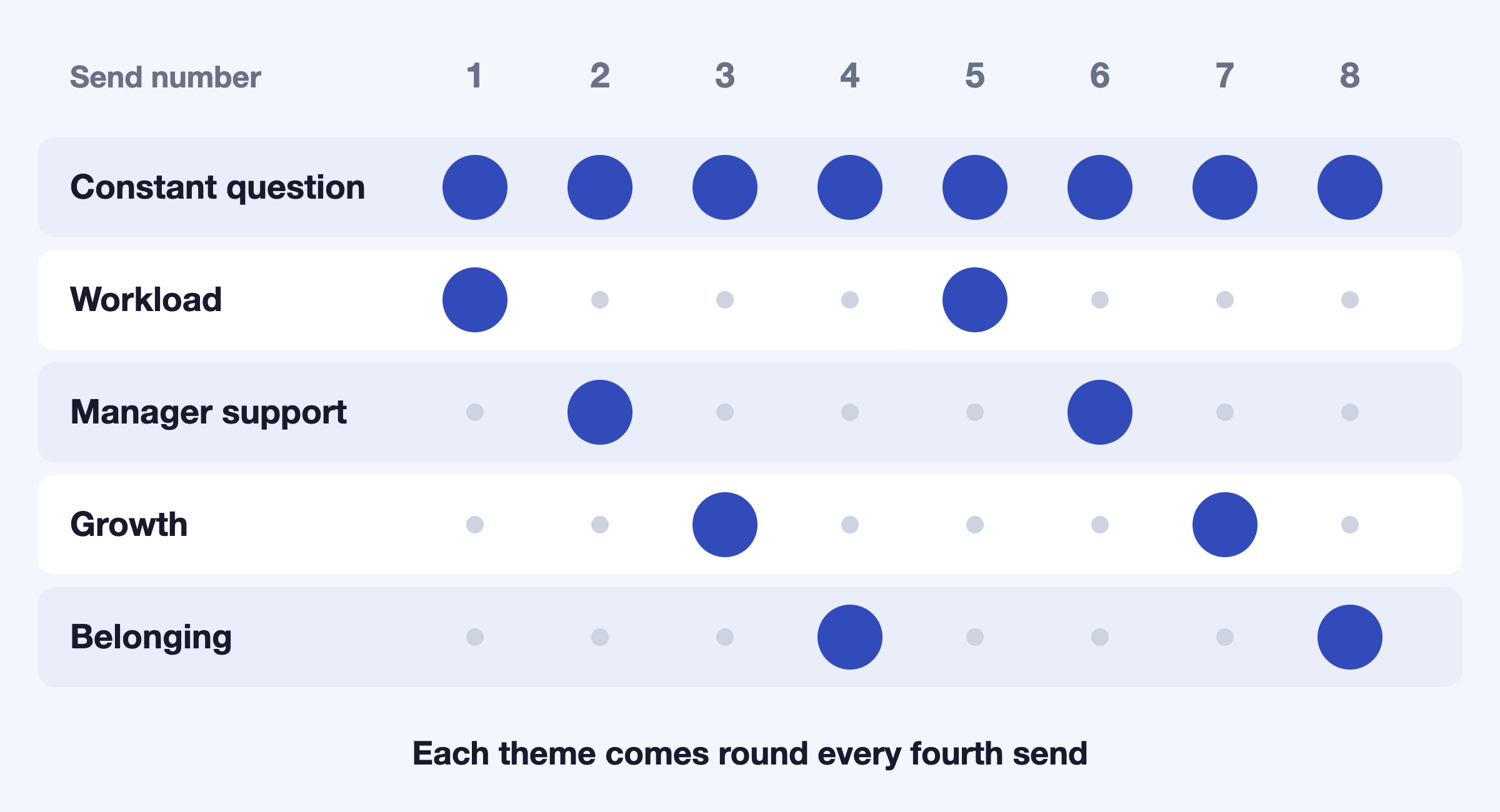
- One question that never changes. A simple "How are you feeling about work this week?" gives you a trend line you can compare send to send.
- One rotating theme of two to four questions. Workload, manager support, growth or belonging, one at a time, each coming back on a fixed schedule.
That keeps every send short, which protects response, and still covers the whole picture over a few sends. It also keeps you to Gallup's advice of one or two themes at a time.
Plan your pulse before you send it
Before you send the first one, check what your numbers will support. The planner below uses your headcount and the response rate you expect. Nothing is sent anywhere.
Pulse survey planner
Change any input and the results update.
Answers you can expect per send
42
The range is a rough 95% interval for a percent-favourable result near 50%, the widest case, with a correction for asking a small fixed group. It assumes the people who didn't answer feel like the people who did. The group size assumes a floor of five answers before a team's result is shown.
With the defaults, 60 people at a 70% response rate give you 42 answers per send. On a result near 50% that's a range of about plus or minus 8 points, and you could show a team of eight on its own. That arithmetic is ours, and it's deliberately rough. It's there to stop you reading a three-point move as news.
What a pulse can't tell a small team
Perceptyx is candid about this: small-sample pulses won't give useful data for managers or others lower in the organisation. In a 60-person company, a pulse split by team gives you groups of five or six answers, where one person's bad week moves the number. Pulsy keeps groups under five private in its breakdowns, which protects people and stops you over-reading tiny groups.
So use the pulse for what it's good at. It tells you which way the whole company is moving and which theme is slipping. For the manager-level conversation, read the comments, and run a bigger survey when you need depth. If your pulse includes a single recommend question, the arithmetic of reading it as a range is in our eNPS guide.
Closing the loop
This is where most pulse programmes quietly die. Perceptyx reports that 74% of organisations that took action after surveys saw engagement improve, against 8% of those that didn't. Gallup says the same thing in plainer terms: if leaders run a survey and take no action on the results, engagement will likely decrease and turnover will increase.
Both come from vendors with something to sell, so don't treat the percentages as laws. The mechanism is easy to see, though. If people answer five pulses and nothing visibly changes, they stop answering the sixth.
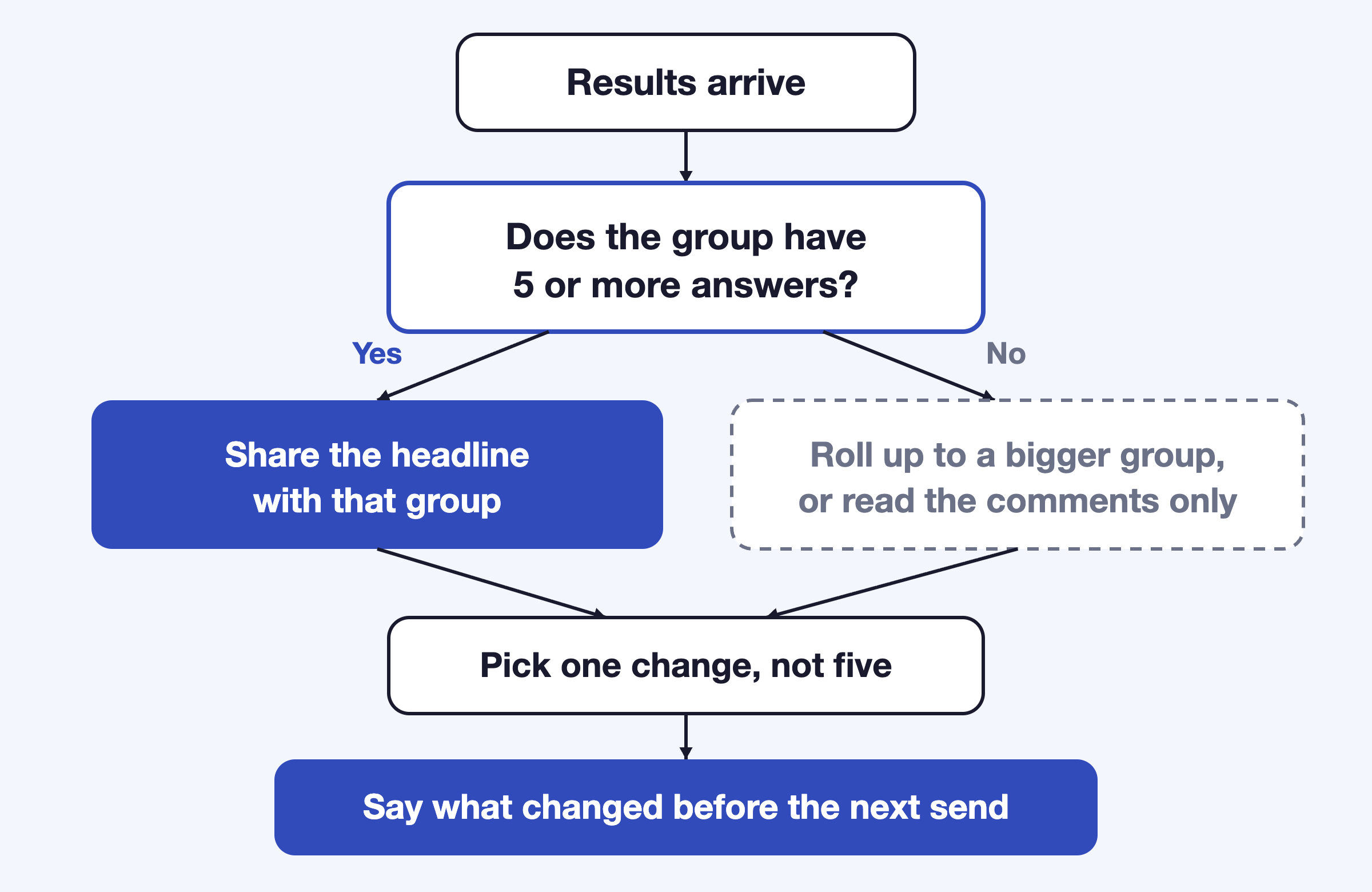
Keep it small. Pick one change, name it in the channel, and open the next pulse by asking whether it helped. That turns each send into the answer to the last one, which is the opposite of a survey nobody believes in.
Running pulse surveys in Slack or Teams
You can run a pulse in a form tool and a calendar reminder, and plenty of teams do. The failure usually comes around the third send, when whoever owns it is busy, the reminder lapses and the results sit in a spreadsheet. Pulsy sends pulse surveys as a Slack or Microsoft Teams message on a recurring schedule you set, collects answers in the thread, and shows results in a web dashboard with segmentation and exports. It's free under 10 employees, and 1,000+ HR teams use BuddiesHR, which has a 4.8/5 rating on G2.
Install Pulsy free and send your first pulse this week. For the step-by-step version, see how to create a survey in Slack. If you want the use-case view first, it's on the measuring engagement page. And if you're not sure people will answer honestly at all, there are signals that don't depend on a survey in how to measure employee engagement without surveys.
FAQ
How often should you run a pulse survey?
Gallup and Perceptyx both point to monthly or quarterly. Choose the slowest cadence at which you can still act between sends, because results nobody acts on are what cause survey fatigue. Weekly is realistic only for a single light question.
How many questions should a pulse survey have?
Gallup says five to 10 on one or two themes, and Paylocity says five to 15. For a small team, one constant question plus a rotating theme of two to four keeps each send short and still covers a lot of ground over a few sends.
Are pulse surveys anonymous?
Usually, and they should say so before people answer. Gallup notes that perceived anonymity is what drives honest responses. Set a minimum group size so results for a handful of people aren't shown, since a small group can point to an individual.
What's the difference between a pulse survey and an engagement survey?
An engagement survey is long, broad and run once or twice a year. A pulse survey is short, narrow and repeated. The engagement survey gives you depth, and the pulse tells you which way things are moving between them.