Slack apps for HR teams: the seven worth installing
Most lists of Slack apps for HR teams are sorted by category, which is how you end up with nine apps and six dead ones. Sorted by chore instead: seven jobs, what runs each, and why five point tools cost more than they look.

Most lists of Slack apps for HR teams are sorted by category: engagement, productivity, culture, fun. That is a fine way to browse a marketplace and a poor way to decide what to install. Sort by category and you take one from each column, finish with nine apps, and watch six of them go quiet by March.
Here is a better filter. An app earns a place in your workspace only if it retires something: a spreadsheet, a recurring meeting, a reminder you were carrying in your head, or a tab someone has to remember to open. If you can't name what it replaces, you're adding a tool rather than removing work.
So this list is sorted by chore. Seven of them, roughly in the order they start to hurt.
The seven chores that eat an HR week
1. Asking the team something and getting an answer
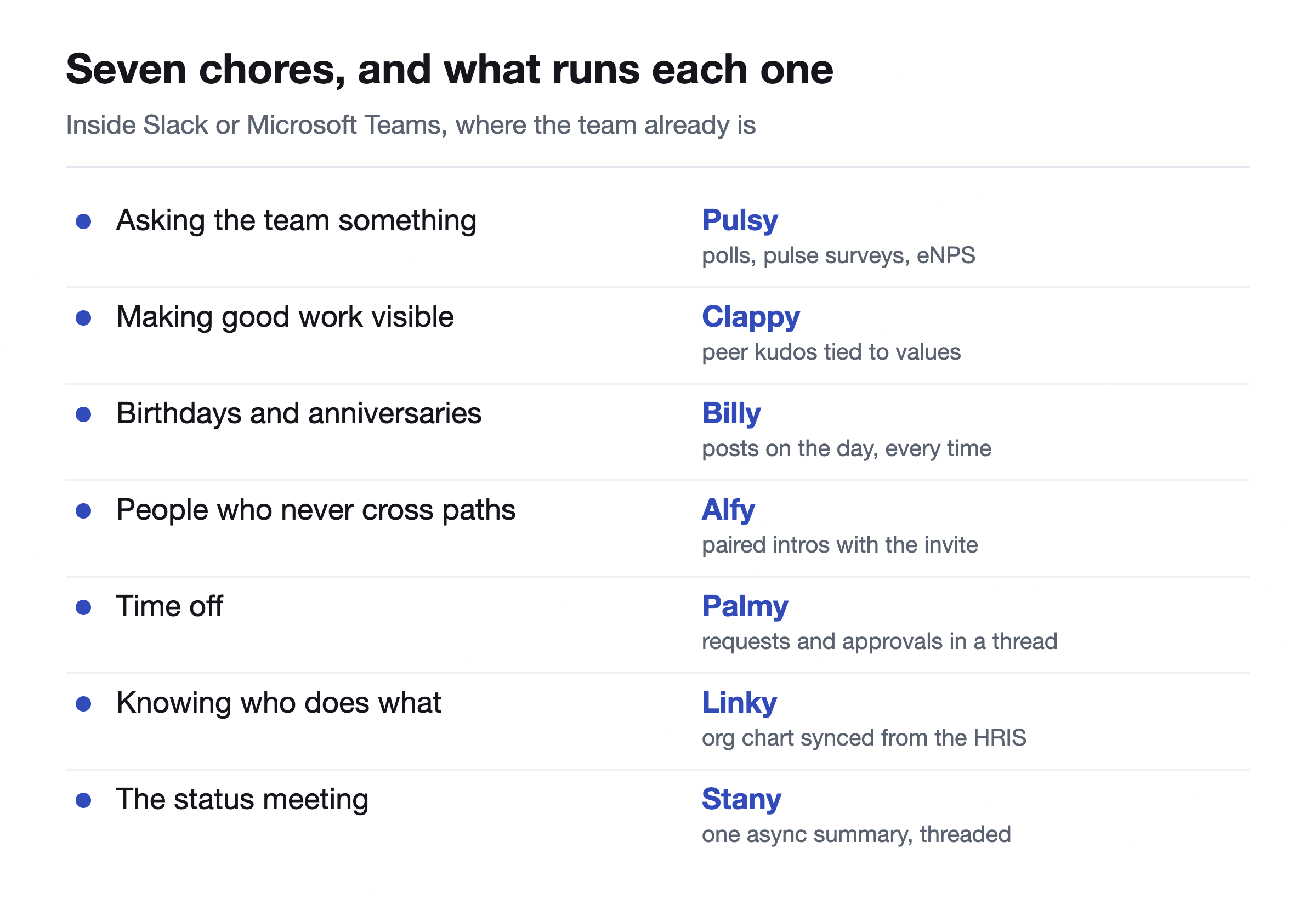
The chore: you need a decision, a temperature check or an eNPS number, and the survey tool you already pay for comes back at a response rate low enough that the result means nothing.
What runs it instead: Pulsy posts the question as a message and collects the answer in the thread. Polls with anonymous voting, recurring pulse surveys, eNPS tracking over time, and a web dashboard when you need to show the numbers to someone. The difference isn't the question set. It's that answering costs one click in a window that is already open. Our own figure for response rates on Pulsy is above 80 percent, which is first-party rather than independent research, so weigh it as ours.
2. Making good work visible
The chore: someone quietly holds the team together for six months and then resigns, and the exit conversation is the first time anyone says so out loud.
What runs it instead: Clappy puts peer kudos in a public channel, attaches a company value to each one, and reports which values actually get used and who never gets mentioned. If you're weighing whether to bolt a points catalogue onto it, read rewards versus recognition first, because the order matters more than the budget. For a wider look at the category, we compared the peer recognition apps for Slack separately.
3. Birthdays and work anniversaries
The chore: you're the person who remembers. Every month, on your own time, usually late.
What runs it instead: Billy collects the dates once, then posts on the day with a message you can template in advance, and holds weekend dates until Monday so nobody gets pinged on their day off. This is the smallest app on the list and usually the first one a team notices is missing. If you'd rather wire it up by hand first, here's how to set up birthday reminders in Slack.
4. People who never cross paths
The chore: design has not spoken to support since the office closed, and the fix keeps being proposed as a monthly all-hands nobody wants.
What runs it instead: Alfy pairs people on whatever cadence a channel picks, weights the pairing away from same-team and repeat matches, respects time zones, and suggests a slot with the invite attached. One click to snooze a round, automatic re-inclusion in the next one. It replaces the scheduling, which is the part that actually killed your last attempt. More options in the watercooler apps roundup.
5. Time off
The chore: a shared spreadsheet, a colour code only you understand, and the week two people booked the same days and nobody caught it.
What runs it instead: Palmy takes the request as a slash command, puts the approval in a thread, and lets people check their own balance without asking you. Location-based policies and holiday imports handle the part that gets messy once you hire in a second country. If you're still sizing up the category, we keep a comparison of vacation trackers for Slack, and the PTO accrual calculator is free to use whether or not you install anything.
6. Knowing who does what
The chore: a new hire asks who owns billing, and the honest answer takes three DMs and a guess.
What runs it instead: Linky builds the org chart and the employee directory inside the chat tool and updates them from your HRIS, so nobody owns a manual sync job. That last part is the whole game: a directory two months out of date sends people back to asking around, which is the problem it was supposed to solve. We went deeper on this in employee directory software and in building an org chart from Slack.
7. The status meeting
The chore: fifteen minutes every morning, eight people, most of it irrelevant to most of them.
What runs it instead: Stany asks your questions on your schedule and posts one summary message with mood and blockers, replies threaded underneath. The meeting is not shortened. It is gone, and the blockers are searchable afterwards. Other options are in the standup apps roundup.
The one on this list that isn't an HR app
Install the Google Calendar or Outlook Calendar integration anyway. The notification a minute before a meeting starts retires a habit rather than a tool: the half-attention you spend all day checking whether you're late. It costs nothing and it is the app people thank you for most often.
Why five separate apps costs more than it looks
Here is where the category lists quietly hurt you. Take one from each column and you have signed up with five vendors. Five bills, five admin panels, five renewal dates, five support contacts, and five sets of data that never meet.
The data part is the one people underestimate. Recognition that can feed a review cycle, an org chart that can segment a survey, time off that shows up next to a standup: separate vendors cannot do any of that, however good each one is on its own. And when you drop the one you stopped using, you find out what the annual term actually said.
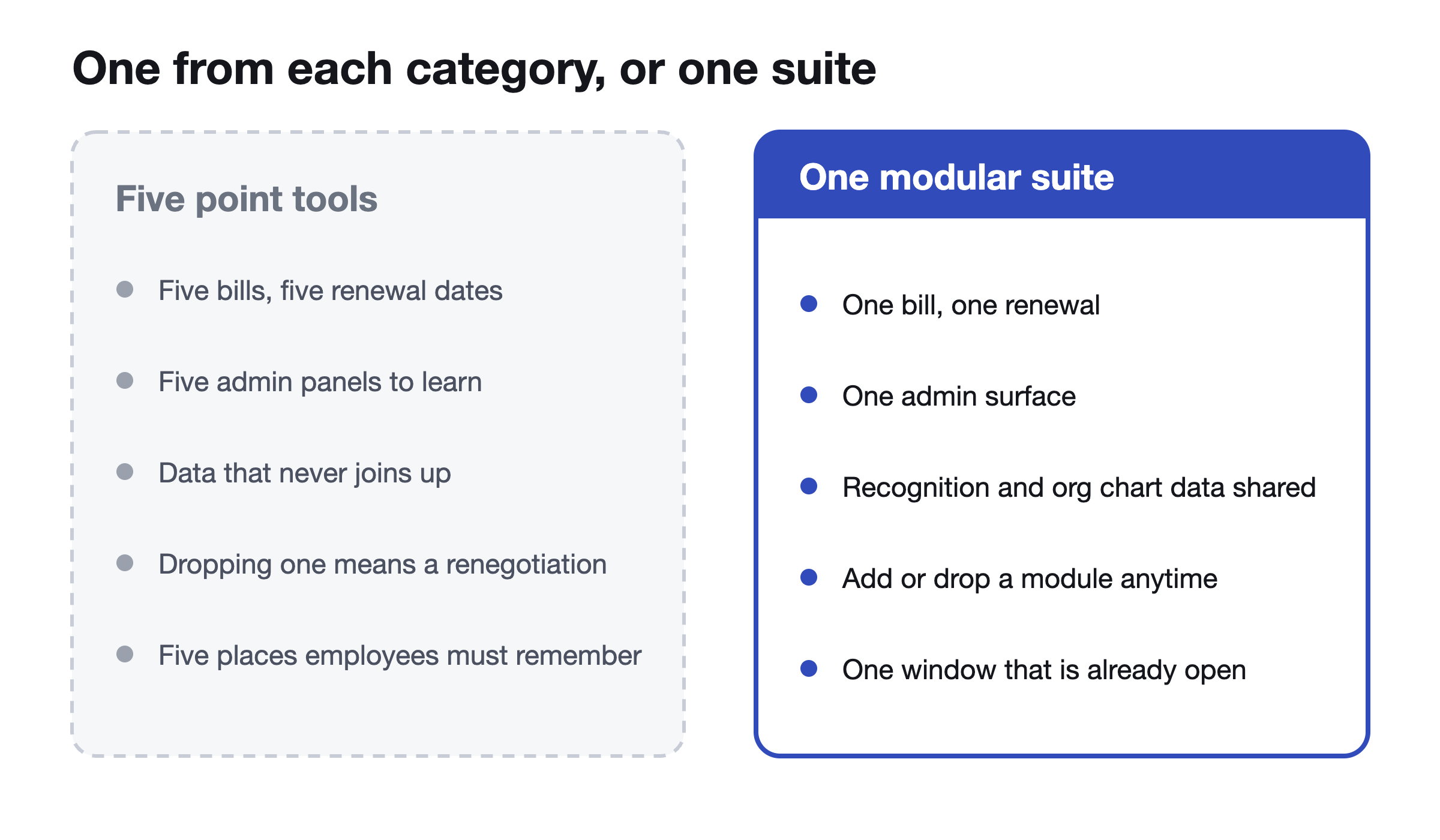
BuddiesHR is built as separate modules for this reason. Each app installs on its own, works on its own, and is priced on its own, so you add the ones that match a chore and drop the ones you stop using without renegotiating anything. The pricing page has the current structure, and it is free under 10 employees if you want to test one before it is anyone's decision.
Where to start if you only install one
Name the chore that has annoyed you most in the last month, and install the app for that one. Not the full set.
- Two people booked the same week off: start with time off.
- A resignation surprised you: start with recognition, then a pulse survey a month later.
- New hires keep asking who owns what: start with the directory.
- You are personally the birthday calendar: start with celebrations, it takes about a minute.
- Your morning standup has become a reading of yesterday: start with async standups.
Then leave it alone for a month before adding a second one. Adoption is the only metric that matters here, and it is easy to read with one app running and impossible to read with five.
Sched runs its culture work this way, with kudos and celebrations, and no full-time HR hire behind it. Across the suite, BuddiesHR is rated 4.8 out of 5 on G2 by over 1,000 HR teams, with Grid Leader, High Performer and Best Results badges.
If the wider question is which parts of the job to hand over rather than which app to install, we wrote that up in HR automation for small business.
FAQs
What Slack apps do HR teams actually use?
In practice, seven jobs cover most of it: surveys and polls, peer recognition, birthdays and work anniversaries, cross-team pairing, time off, an org chart and directory, and async standups. Most teams start with one of those, not all seven.
How many Slack apps is too many?
The number matters less than whether each one replaced something. Nine apps that each retired a spreadsheet or a meeting is fine. Three that added a new place to check is already too many.
Do these work in Microsoft Teams as well as Slack?
Every BuddiesHR module runs natively in both, on the same data, so a company mid-migration or running both surfaces doesn't have to pick. The calendar integration exists on both sides too.
Are Slack apps for HR free?
It depends on the shape of the pricing more than the vendor. Some charge a flat platform fee, some charge per admin seat, some charge per employee for the single module you use. BuddiesHR is the last kind and is free under 10 employees, with a trial above that. Check any vendor's own pricing page for current numbers, since none of these are fixed.
Pick the chore that annoyed you most this month. Install the app for that one free in about a minute, in Slack or Microsoft Teams, and add the others only when they earn it.